
Bring your own MCP servers and combine them into one URL
Add any remote MCP server that speaks Streamable HTTP over HTTPS — your team's server, a vendor's hosted endpoint, or one you found in a directory. KumoMCP stores its credential, lets you choose which of its tools to expose, and serves it together with everything else you've connected from a single URL.
- No auth, bearer token or custom header
- Write tools start switched off
- Calls never metered
What people build with it
An SEO research endpoint
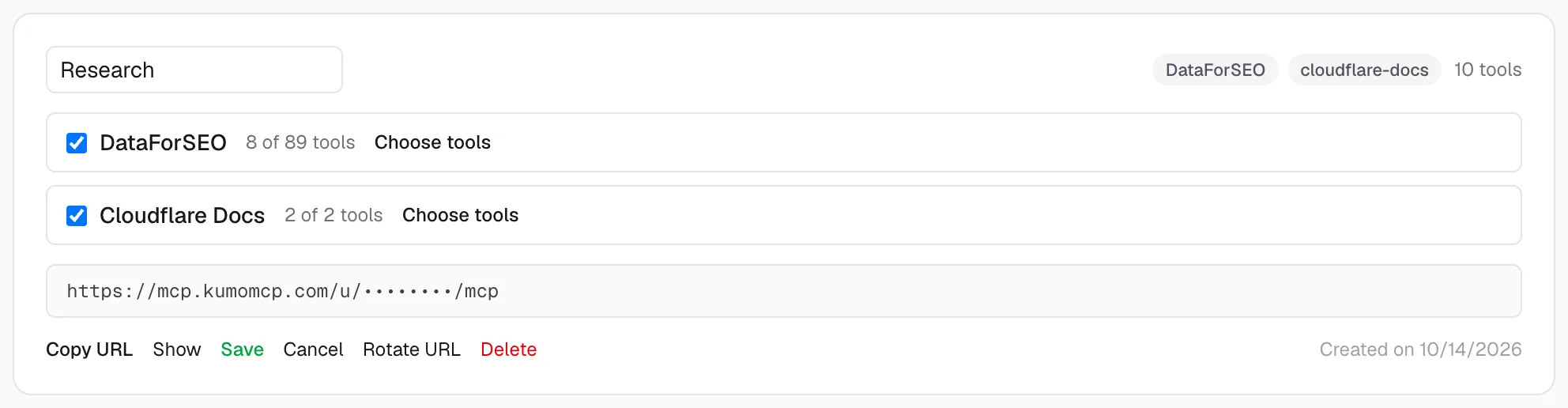
Search Console, GA4 and a dozen hand-picked DataForSEO tools, so your assistant can put market data next to your own numbers.
A team endpoint
Your team's internal docs server plus a vendor's MCP server, read-only, shared as one URL instead of a page of setup instructions.
One endpoint per client
A lean endpoint for Claude.ai or ChatGPT and a fuller one for Claude Code, built from the same connected servers.
How KumoMCP handles your server
- Before saving, we connect and list its tools; a wrong URL or a refused connection fails right away instead of on your first call.
- Tool names get the server's id as a prefix (for example custom_docs__search), so two servers can never collide.
- Tools the server marks read-only are on by default. Anything that might change data starts switched off until you turn it on — we use the server's readOnlyHint annotation when it has one, and a conservative name check when it doesn't.
- When the server adds tools, refresh its tool list from the Services page and pick the new ones per endpoint.
Set it up in three steps
- 1
Add the server
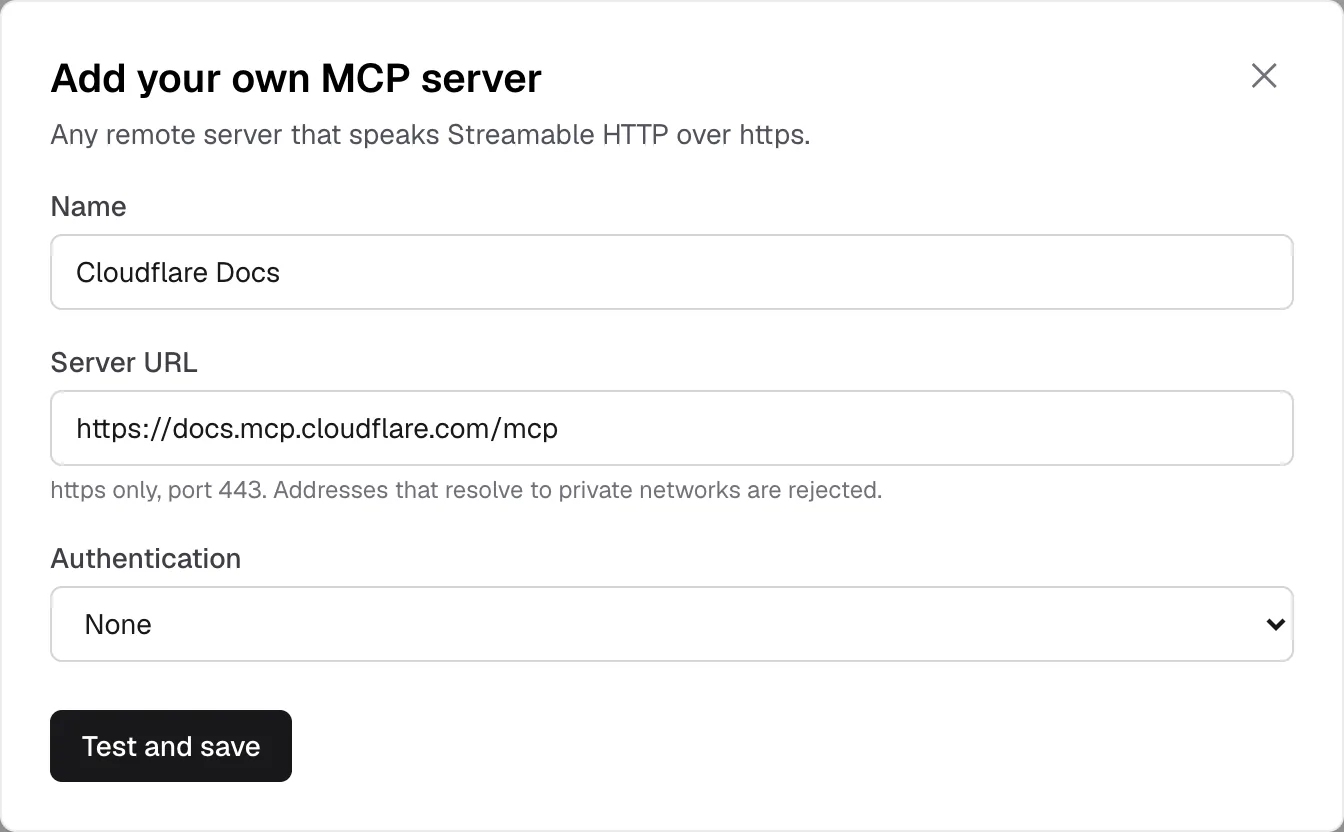
Open Services → Add your own MCP. Give it a name, paste its https URL and choose how it authenticates: no auth, a bearer token, or a custom header.
- 2
We test the connection
KumoMCP connects, lists the tools, and saves the server only if that works. The credential is encrypted before it's stored and never shown back.
- 3
Put it in an endpoint
Combine it with your other servers, tick the tools you want, and paste the endpoint URL into your MCP client.
What it looks like
Real screens from the product. Account details are masked.
Add the endpoint to your client
Your dashboard shows these with your real URL filled in, ready to copy.
Claude Code
Terminalclaude mcp add --transport http kumomcp-tools https://mcp.kumomcp.com/u/YOUR-ENDPOINT-TOKEN/mcpAdd --scope user to make it available in every project, or --scope project to share it via .mcp.json.
Codex
Terminalcodex mcp add kumomcp-tools --url https://mcp.kumomcp.com/u/YOUR-ENDPOINT-TOKEN/mcpCursor
.cursor/mcp.json (project) or ~/.cursor/mcp.json (global){
"mcpServers": {
"kumomcp-tools": {
"url": "https://mcp.kumomcp.com/u/YOUR-ENDPOINT-TOKEN/mcp"
}
}
}Claude Desktop · Claude.ai · ChatGPT
Endpoint URLhttps://mcp.kumomcp.com/u/YOUR-ENDPOINT-TOKEN/mcpClaude Desktop and Claude.ai: Settings → Connectors → Add custom connector, paste the URL and leave the OAuth fields empty. ChatGPT: Settings → Connectors → Developer mode → Create, paste the URL, authentication: none.
A local aggregator vs. KumoMCP
You can also merge servers with an aggregator process on your own machine. The difference is where it runs:
| Aspect | Local aggregator | KumoMCP |
|---|---|---|
| Runs on | Each machine, started by your client | Our servers; clients just get a URL |
| Credentials | In config files on every machine | Stored once, encrypted |
| Claude.ai and ChatGPT | Not supported: web clients can't launch local processes | Supported: it's a remote URL |
| Tool filtering | Depends on the aggregator | Allowlist per endpoint, writes off by default |
| Cost | Free; you run it | Free for 2 servers; calls never metered |
Requirements and limits
- The server must be reachable on the public internet over https on port 443. Addresses that resolve to private networks are refused.
- Authentication can be none, a bearer token, or one custom header. Servers that only support OAuth sign-in — Notion's hosted MCP server, for example — can't be added yet.
- Local stdio servers can't be added directly; run them behind an https endpoint first.
- The free plan includes 2 connected servers and 1 endpoint. Pro removes the server limit and allows up to 10 endpoints.
Your own MCP server: common questions
What kinds of MCP servers can I add?
Any remote server that speaks MCP over Streamable HTTP at a public https URL and authenticates with no credential, a bearer token or a single custom header.
Do you store responses from my server?
No. Each request is forwarded with your credential and the response goes straight back to your MCP client. We keep the server's tool list (names, descriptions and input schemas) so you can choose tools per endpoint.
Why combine servers instead of adding each one to my client?
One URL to manage across every client and machine, credentials in one place instead of in each config file, and a curated tool list per endpoint so your assistant isn't choosing among hundreds of tools.
Can I add servers that use OAuth?
Not yet. Today a server needs to accept no auth, a bearer token or a custom header. OAuth-only servers are on the roadmap.
Is there a limit on calls?
No. Calls are never metered on any plan; the upstream server's own rate limits still apply.
Keep reading
Wire your MCP servers into your AI in 2 minutes
Free to start, no credit card, calls never metered. Your assistant is one URL away.
Start free