
Google Search Console MCP server, hosted for you
Give your AI assistant read-only access to your Search Console data — queries, pages, indexing and sitemaps — through one MCP URL. Sign in with Google, pick your sites, and paste the URL into Claude, ChatGPT, Cursor or Codex. Nothing runs on your machine.
- 13 read-only tools
- Google sign-in, no Cloud project
- Free for 1 site, unlimited calls
What you can ask
Plain-language questions, answered from live data. Each one shows the tools your assistant will call.
“Which queries lost the most clicks over the last 28 days compared with the 28 days before?”
compare_search_periods“List queries where we rank between 8 and 20 with at least 500 impressions — our quickest wins.”
get_advanced_search_analytics“Which queries bring people to /pricing, and what's the click-through rate for each?”
get_search_by_page_query“Is /blog/launch-post indexed? If not, what does Google say about it?”
inspect_url_enhanced“Check these 20 URLs from last week's release for indexing problems.”
check_indexing_issues“Do any of our sitemaps have errors or warnings right now?”
list_sitemaps_enhanced13 tools, all read-only
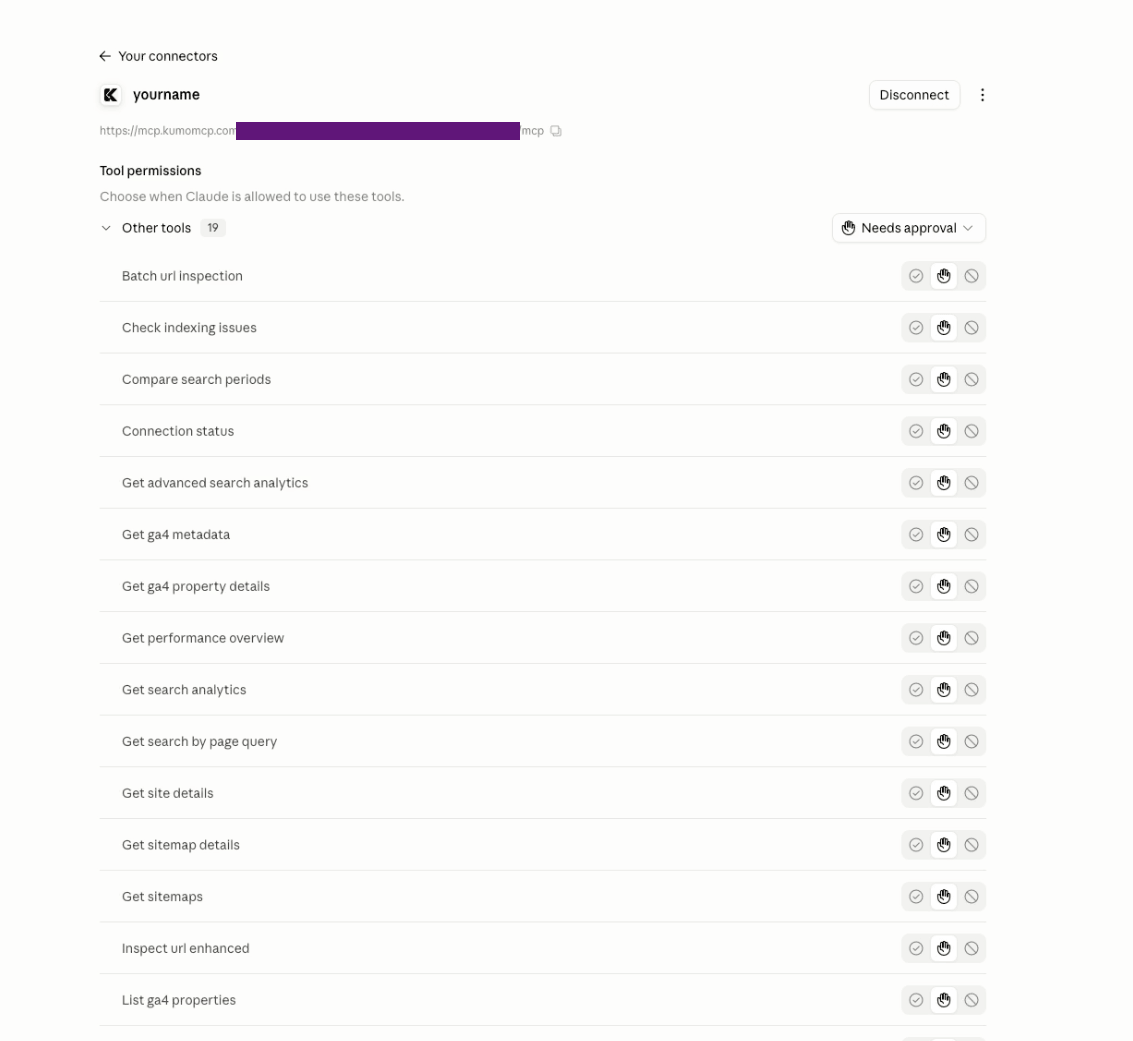
Every tool reads; none can submit sitemaps, request indexing or change a property. Inside an endpoint you can switch off any you don't want.
list_properties- List the Search Console sites selected for this endpoint.
get_site_details- Details of one Search Console property.
get_search_analytics- Clicks, impressions, CTR and position by query, page, country or device.
get_performance_overview- A performance summary for a property over a date range.
compare_search_periods- Compare search performance between two date ranges.
get_search_by_page_query- Queries that bring traffic to one specific page.
get_advanced_search_analytics- Search analytics with filters, sorting and pagination.
inspect_url_enhanced- How Google sees a URL: index status, canonical, crawl, rich results.
batch_url_inspection- Inspect several URLs at once.
check_indexing_issues- Find indexing problems across a list of URLs.
get_sitemaps- List the sitemaps submitted for a property.
list_sitemaps_enhanced- Sitemaps with status, errors and warnings.
get_sitemap_details- Details of one sitemap.
Set it up in three steps
- 1
Connect Google
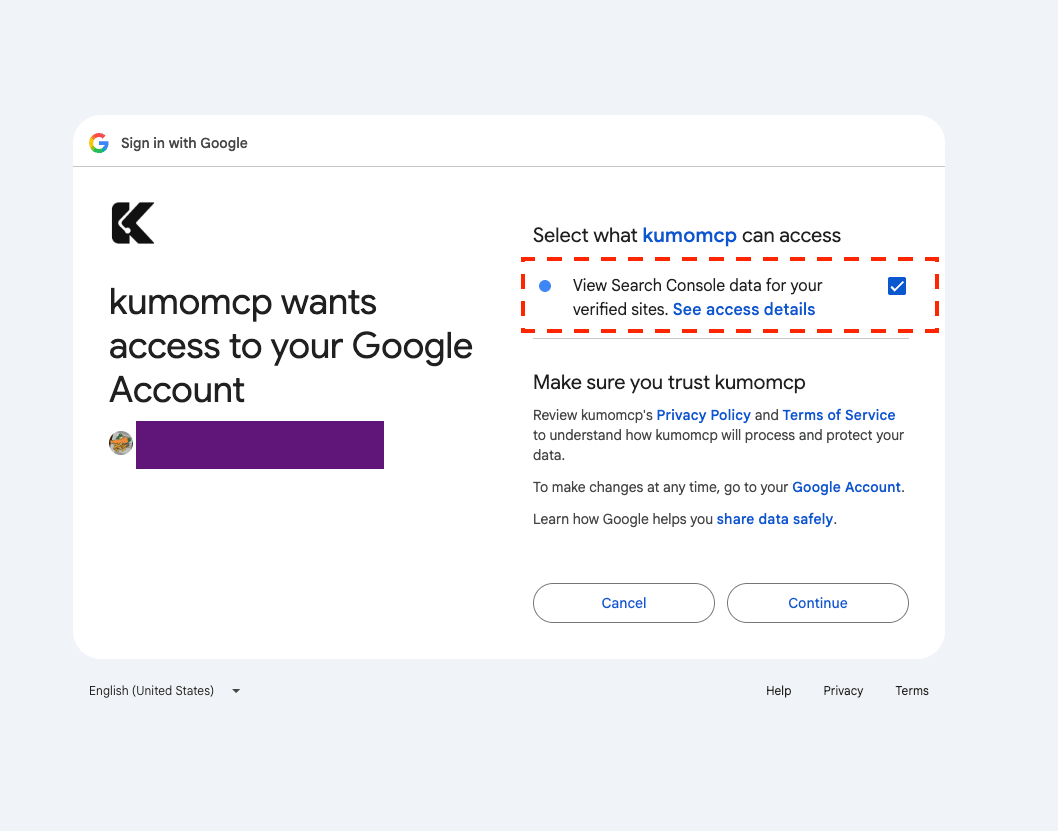
Create a free account, open Services and choose Google Search Console. Google asks for a single read-only permission.
- 2
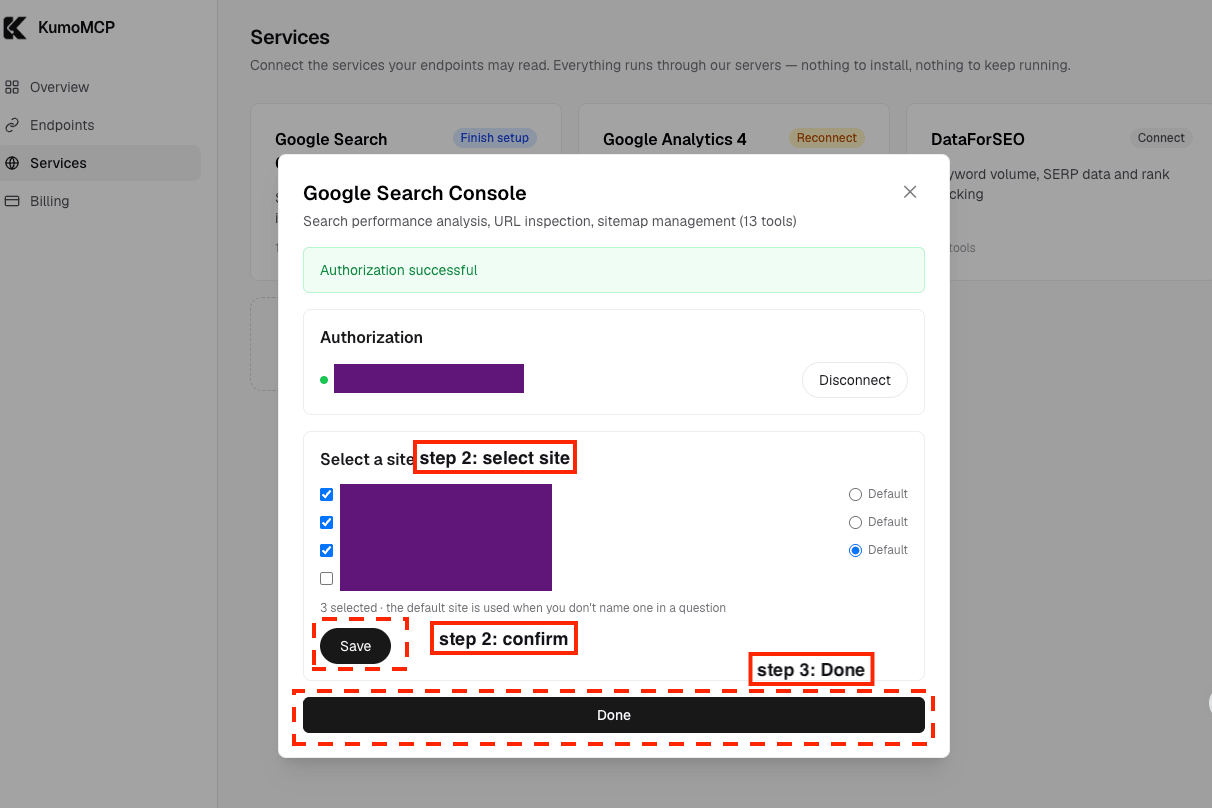
Pick your sites
Choose which properties the connection may read — domain properties (sc-domain:) and URL-prefix properties both work. The free plan includes 1 site; Pro removes the limit.
- 3
Create an endpoint and paste the URL
Put Search Console in an endpoint — on its own or alongside GA4 and other servers — choose its tools, and paste the URL into your MCP client.
What it looks like
Real screens from the product. Account details are masked.
Add the endpoint to your client
Your dashboard shows these with your real URL filled in, ready to copy.
Claude Code
Terminalclaude mcp add --transport http kumomcp-seo https://mcp.kumomcp.com/u/YOUR-ENDPOINT-TOKEN/mcpAdd --scope user to make it available in every project, or --scope project to share it via .mcp.json.
Codex
Terminalcodex mcp add kumomcp-seo --url https://mcp.kumomcp.com/u/YOUR-ENDPOINT-TOKEN/mcpCursor
.cursor/mcp.json (project) or ~/.cursor/mcp.json (global){
"mcpServers": {
"kumomcp-seo": {
"url": "https://mcp.kumomcp.com/u/YOUR-ENDPOINT-TOKEN/mcp"
}
}
}Claude Desktop · Claude.ai · ChatGPT
Endpoint URLhttps://mcp.kumomcp.com/u/YOUR-ENDPOINT-TOKEN/mcpClaude Desktop and Claude.ai: Settings → Connectors → Add custom connector, paste the URL and leave the OAuth fields empty. ChatGPT: Settings → Connectors → Developer mode → Create, paste the URL, authentication: none.
Hosted vs. running mcp-gsc yourself
mcp-gsc is a capable open-source server, and running it locally keeps everything on your machine. What you trade is setup and upkeep:
| Aspect | Self-hosted mcp-gsc | KumoMCP |
|---|---|---|
| Google setup | A Google Cloud project with the Search Console API enabled, plus an OAuth client or service-account JSON file | Sign in with Google in the browser |
| Runs on | Python 3.11+ and uv on every machine you use | Our servers — nothing to install |
| Claude.ai and ChatGPT | Not supported: web clients can't launch local processes | Supported: it's a remote URL |
| Write access | Includes tools that submit or delete sitemaps; destructive site actions sit behind a flag | Read-only scope, no write tools |
| Tools | 20 | 13 |
| Cost | Free; you run it | Free for 1 site; Pro for unlimited sites |
Permissions and your data
- KumoMCP asks Google for one permission: webmasters.readonly, which is read-only. Your assistant can't change Search Console settings through it.
- Your Google refresh token is encrypted with AES-256-GCM before it reaches our database. Disconnect from the dashboard or from your Google account's security page at any time.
- Search Console data is fetched when your assistant calls a tool and goes straight back to your MCP client. We don't keep a copy, and we never use it for advertising or model training.
- Our use of Google data follows the Google API Services User Data Policy, including the Limited Use requirements.
Google Search Console: common questions
Is there an official Google Search Console MCP server?
Google publishes an official MCP server for Analytics, but not for Search Console as of October 2026. Your options are community servers you run yourself, such as mcp-gsc, or a hosted service like KumoMCP that reads the same Search Console API.
Which MCP clients does it work with?
Any client that can add a remote MCP server over Streamable HTTP: Claude Code, Claude Desktop, Claude.ai, ChatGPT (connectors in developer mode), Cursor and Codex. The endpoint URL is the credential, so there's no OAuth step in the client — paste the URL and you're done.
How fresh is the data?
It's the same data you see in Search Console, read through Google's API. Performance data usually trails by two to three days, and Search Console keeps 16 months of history.
Does it work with domain properties?
Yes. A domain property (sc-domain:example.com) covers every subdomain and protocol; to focus on one subdomain, ask your assistant to filter by page. URL-prefix properties work too.
Can my assistant change anything in Search Console?
No. The connection only has Google's read-only Search Console permission, and none of the tools submit sitemaps, request indexing or edit a property.
Is usage really unlimited?
We never meter MCP calls on any plan. Google's own API quotas still apply — URL inspection in particular is capped per property per day, so batch inspection suits spot checks better than full-site audits.
What happens if my endpoint URL leaks?
Rotate it from the Endpoints page. The old URL stops working and you paste the new one into your clients.
Keep reading
Wire your MCP servers into your AI in 2 minutes
Free to start, no credit card, calls never metered. Your assistant is one URL away.
Start free