
September 30, 2026
Connect Search Console and GA4 to Claude Code and Codex
Two ways to give Claude Code and Codex access to Google Search Console and GA4 through MCP - run open-source servers locally, or use one hosted URL.
Claude Code and Codex are where a lot of SEO and growth work happens now: you are already in the terminal, next to the code and the content. What they do not know is how that content performs. By default they cannot see your Search Console queries or your GA4 traffic, so every "why did this page drop?" question ends with you exporting a CSV and pasting it in.
This guide explains what the two Google tools give you, what agents and MCP are, why connecting them is worth it, and then walks through the two ways to do it: running open-source servers on your own machine, or using one hosted MCP URL.
What Search Console and GA4 tell you
Google Search Console
Google Search Console (GSC) is Google's free tool for seeing how your site performs in Google Search. It reports what happens before someone reaches your site:
- Search performance. Clicks, impressions, click-through rate (CTR) and average position, broken down by query, page, country, device and date. Google keeps about 16 months of it.
- Indexing. Which pages Google has indexed, which it has not and why. The URL Inspection tool shows how Google sees one specific URL.
- Sitemaps. Which sitemaps you have submitted and whether Google could read them.
In practice it answers questions like: which queries send me traffic, which pages rank on the second page and are worth improving, which titles get impressions but no clicks, and did Google actually index the page I published yesterday.
Google Analytics 4
Google Analytics 4 (GA4) measures what visitors do once they are on your site. It is event-based: page views, scrolls, clicks and purchases are all events, grouped into sessions and users. It reports what happens after the click:
- Traffic sources. Which channels bring visitors: organic search, direct, social, referral, email, paid.
- Behavior. Which landing pages people arrive on, how long they engage, where they go next.
- Outcomes. Key events (what GA4 calls conversions), such as signups or purchases, and which pages and channels lead to them.
It answers questions like: which pages bring engaged visitors, which channels convert, and how many people are on the site right now.
Why you want both
Search Console covers the journey up to the click. GA4 covers what happens after it. A page with plenty of impressions and clicks but poor engagement has a different problem from a page with strong engagement and almost no impressions. You only see that by putting the two side by side.
What agents and MCP are
Agents
An AI agent is an assistant that does more than chat. It reads files, runs commands, calls tools and keeps going until a task is finished. The ones most relevant here:
- Claude Code: Anthropic's coding agent that runs in your terminal.
- Codex: OpenAI's coding agent, available as a CLI, in editors and in the cloud.
- Cursor: an AI code editor with an agent mode.
- Claude Desktop, Claude.ai and ChatGPT: chat assistants that can also call external tools through connectors.
For content and SEO work, an agent in your repository can audit pages, rewrite titles and meta descriptions, fix internal links and draft content briefs. What it lacks is knowledge of how any of it performs.
MCP
The Model Context Protocol (MCP) is an open standard that lets an agent call external tools and data sources. An MCP server exposes tools, for example "run a search analytics query". An MCP client, the agent, discovers those tools and decides when to call them while answering you.
Servers come in two kinds, and the rest of this guide follows that split. A local server is a program that runs on your machine and talks to the agent over standard input and output. A remote server lives at a URL, and the agent connects to it over HTTP.
Why connect them to an agent
- No more export and paste. The agent queries the data itself, at the level of detail the question needs.
- The data sits next to the work. An agent in your repo that can read Search Console picks the pages worth editing from real numbers, edits them, and can check afterward whether Google has indexed the change.
- Questions that cross both sources. "Which pages get many clicks but low engagement?" needs Search Console and GA4 in one conversation.
- It is safe by construction. With read-only permissions, the agent can analyze but cannot change anything in your Google account.
Why MCP rather than a script or a spreadsheet? A script answers the one question you wrote it for. With MCP the agent chooses which tools to call and combines them, and the same connection works across agents without glue code to maintain.
Option 1: run the open-source servers locally
Two projects cover this, one for each Google service.
GA4: google-analytics-mcp
google-analytics-mcp is Google's own server. It is marked experimental and read-only.
You need Python 3.10 or later, pipx and the gcloud CLI. In a Google Cloud project, enable the Google Analytics Admin API and the Google Analytics Data API. Then create Application Default Credentials with the read-only Analytics scope:
gcloud auth application-default login \
  --scopes https://www.googleapis.com/auth/analytics.readonly,https://www.googleapis.com/auth/cloud-platform \
  --client-id-file=YOUR_CLIENT_JSON_FILE
Copy the credentials file path it prints, then register the server. For Claude Code, the README gives:
claude mcp add analytics-mcp \
  --scope user \
  -e "GOOGLE_APPLICATION_CREDENTIALS=PATH_TO_CREDENTIALS_JSON" \
  -e "GOOGLE_PROJECT_ID=YOUR_PROJECT_ID" \
  -- pipx run analytics-mcp
For Codex, the same server uses the stdio form of codex mcp add:
codex mcp add analytics-mcp \
  --env GOOGLE_APPLICATION_CREDENTIALS=PATH_TO_CREDENTIALS_JSON \
  --env GOOGLE_PROJECT_ID=YOUR_PROJECT_ID \
  -- pipx run analytics-mcp
It exposes get_account_summaries, get_property_details,
list_google_ads_links, run_report, run_funnel_report,
get_custom_dimensions_and_metrics and run_realtime_report.
Search Console: mcp-gsc
mcp-gsc is a community server for Search Console. It needs Python 3.11 or later, a Google Cloud project with the Search Console API enabled, and credentials. The recommended path is an OAuth client of type Desktop app: download its JSON file and point the server at it.
The recommended install uses uvx, so install uv first:
curl -LsSf https://astral.sh/uv/install.sh | sh
The README documents a Claude Desktop config. The equivalent for Claude Code follows the same pattern as the GA4 command above:
claude mcp add gsc --scope user \
  -e "GSC_OAUTH_CLIENT_SECRETS_FILE=/full/path/to/client_secrets.json" \
  -- uvx mcp-search-console
And for Codex:
codex mcp add gsc \
  --env GSC_OAUTH_CLIENT_SECRETS_FILE=/full/path/to/client_secrets.json \
  -- uvx mcp-search-console
The first use opens a browser window to sign in, and the token is cached
afterward. If you would rather not use OAuth, the server also supports a
service account: add the service account's email to your Search Console
property, then set GSC_CREDENTIALS_PATH and GSC_SKIP_OAUTH=true.
It has 20 tools, covering search analytics, period comparison, URL inspection,
indexing checks and sitemaps. Note that it includes write-capable tools such as
manage_sitemaps, which submits or deletes sitemaps. Adding and deleting
sites is off by default and needs GSC_ALLOW_DESTRUCTIVE=true.
What local costs you
Running both servers works, and it has real advantages: the code is open, you control everything, and your data goes straight from Google to your machine. The cost is setup and upkeep:
- Two separate installs, with two different runtimes (pipx and uv) and two credential setups.
- A Google Cloud project with APIs enabled and an OAuth client to create.
- Local processes that have to start with your agent on every machine you use.
- No way to use them from Claude.ai or ChatGPT, which cannot launch local processes.
Option 2: connect with KumoMCP
KumoMCP is the hosted version of the same idea. Search Console and GA4 sit behind one remote MCP URL. You authorize Google in the browser, copy one command, and paste it into any agent. There is no Google Cloud project, no local process and no credentials file.
Connect both services
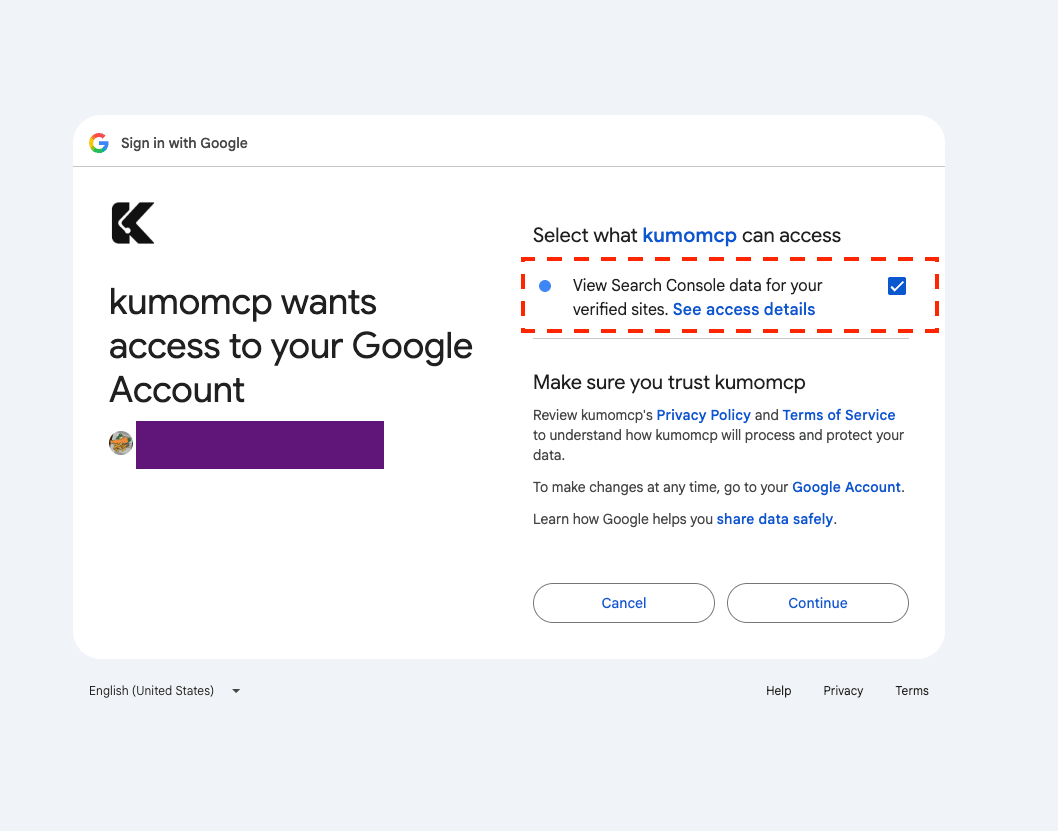
Create an account, open Services in the dashboard and choose Google Search Console. Click Connect Google and approve the read-only permission. Google's consent screen lists exactly what you are granting:
Back in the dashboard, the dialog is three steps: authorize, tick your site and click Save, then click Done. If you select several sites, the radio button marks the default one, which the agent uses when a question does not name a site. The screenshot is from a Pro account with several sites; the free plan covers one.
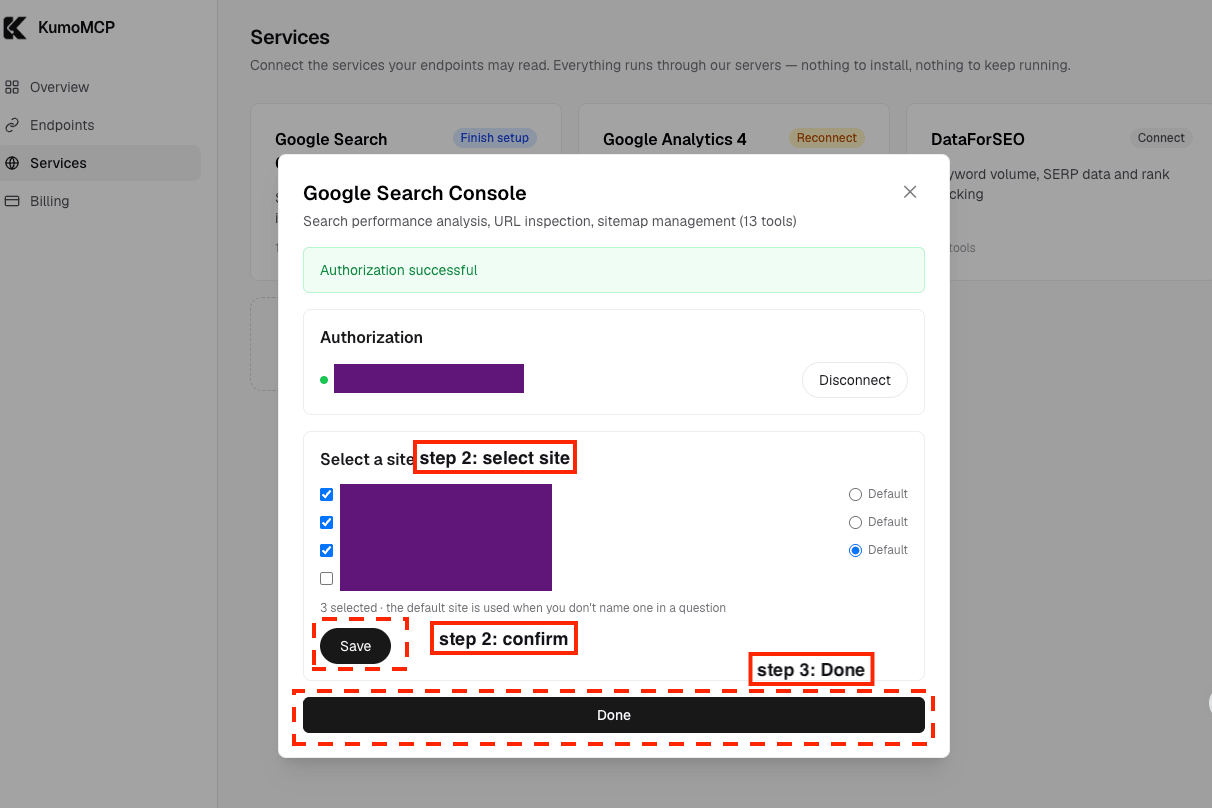
If the site list says "No sites found", you authorized a Google account that cannot see the property. Disconnect and reconnect with the right one.
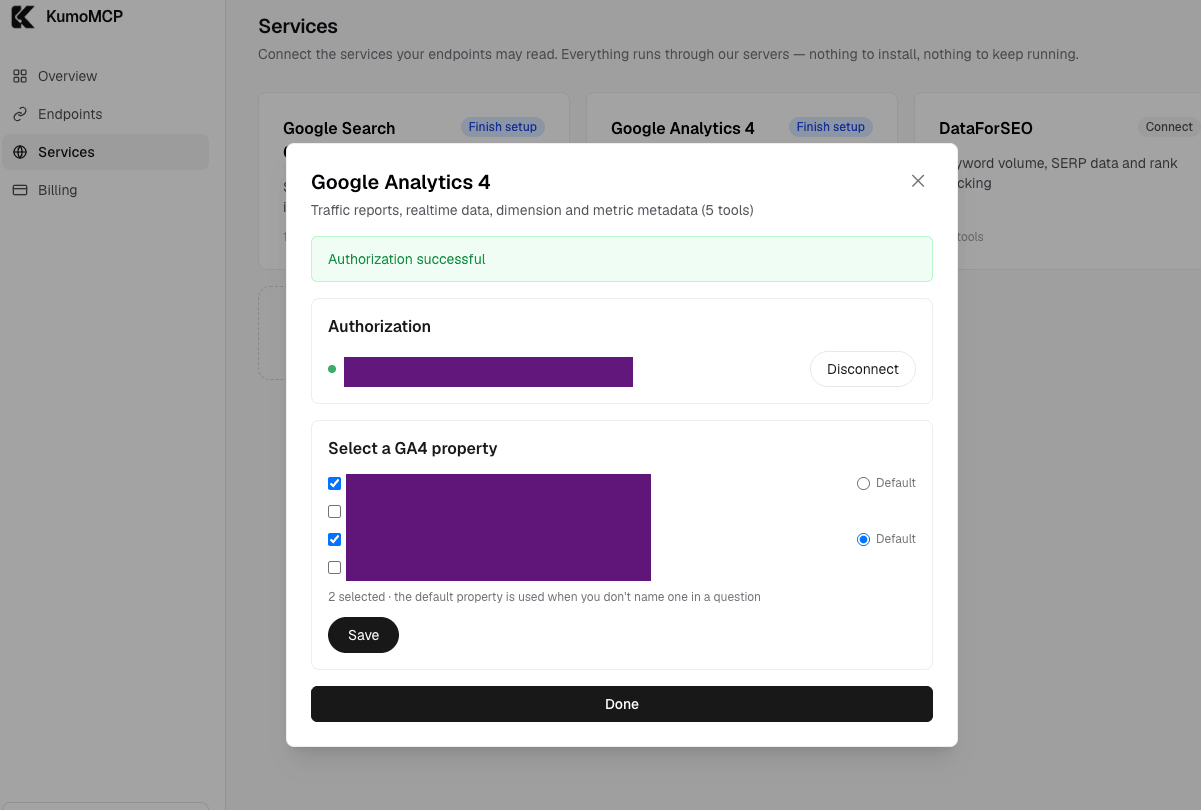
Then open Google Analytics 4 and select your property. Google asks you to approve the read-only Analytics permission on top of the Search Console one. It is the same Google connection, so there is no second sign-in.
Create the endpoint
Go to Endpoints and click Create your first endpoint. KumoMCP creates a
Default endpoint that bundles every service you connected, with all tools
ticked. Here that is Search Console and GA4: 18 data tools, plus a
connection_status helper. Use Choose tools to untick any you do not want
the agent to see. The free plan includes one endpoint; New endpoint adds
more on paid plans.
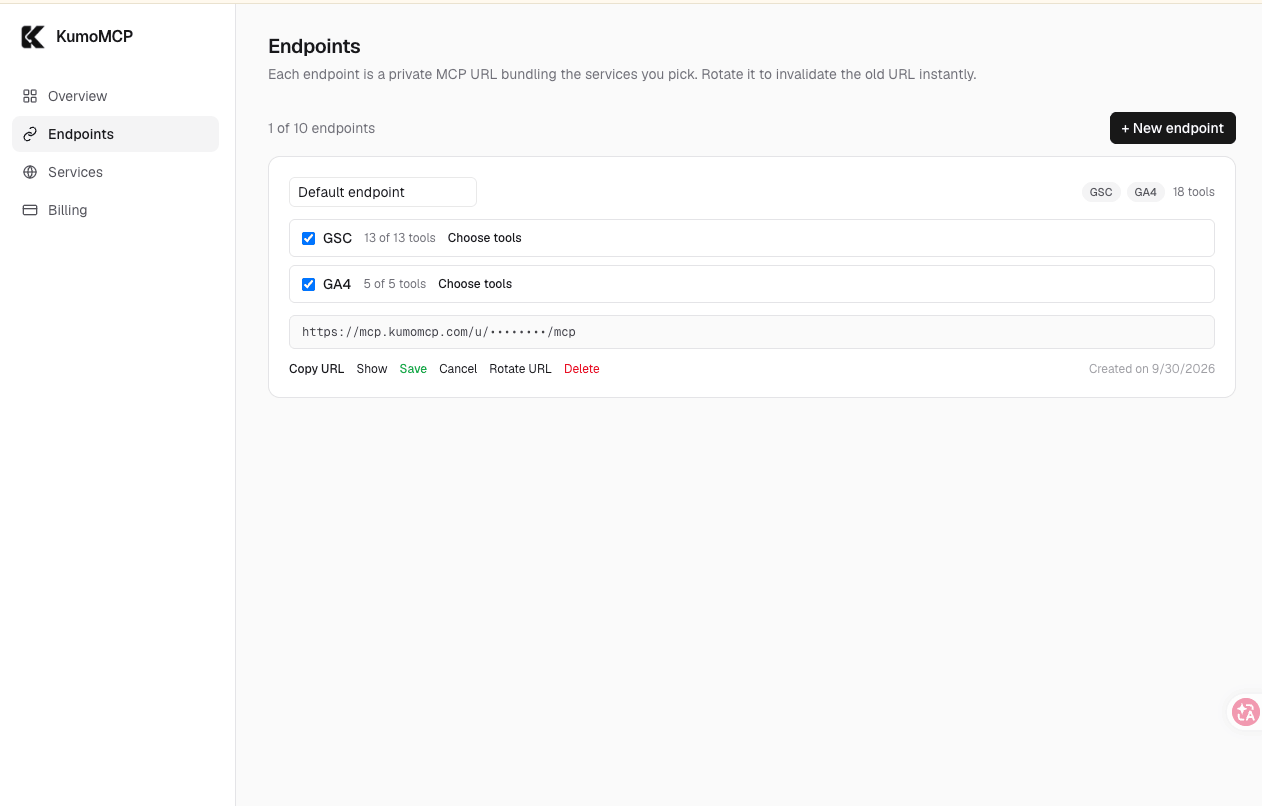
The endpoint is a URL shaped like https://mcp.kumomcp.com/u/<token>/mcp. The
token is the credential, so treat the URL like a password.
Add it to Claude Code and Codex
Open Overview and find Connect an agent. Pick your client's tab: Claude Code, Codex, Cursor, or Claude Desktop · Claude.ai · ChatGPT. The URL stays masked on screen, and Copy puts the full command on your clipboard. This is the Codex tab:
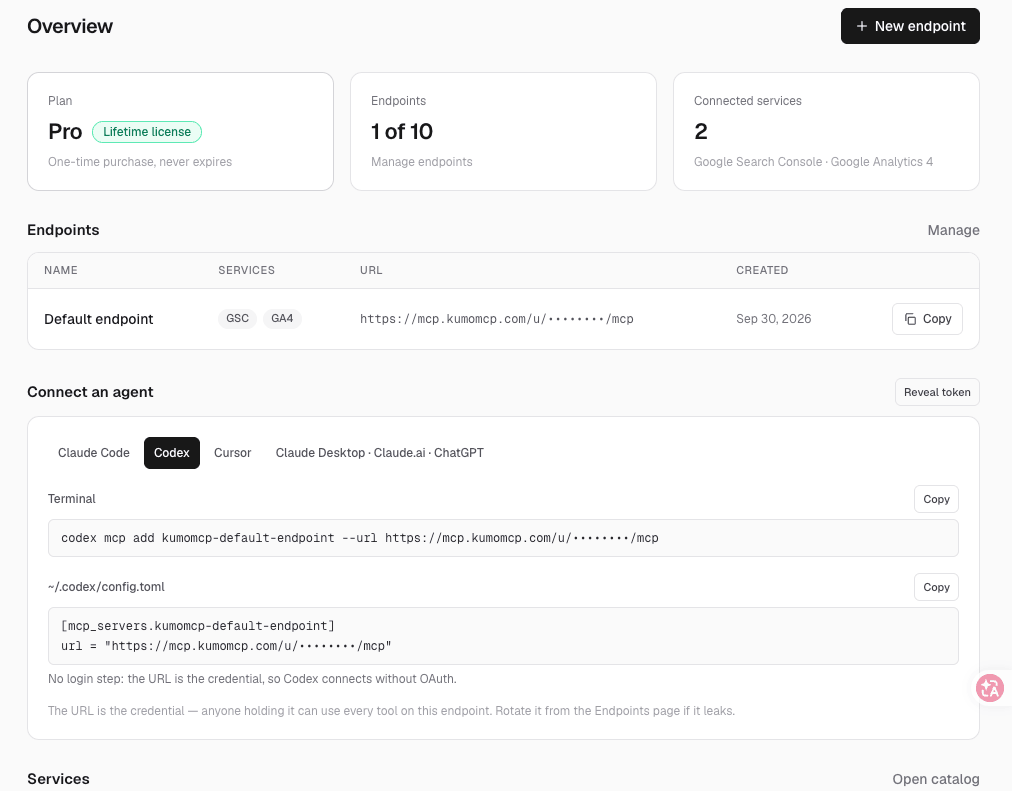
The name after mcp add is built from your endpoint's name. For Claude Code the
command looks like this:
claude mcp add --transport http kumomcp-default-endpoint <your-endpoint-url>
Keep --transport http. Without it Claude Code assumes a local process. Add
--scope user to have the endpoint in every project. Avoid --scope project
for this endpoint: it writes the URL into a .mcp.json file that usually gets
committed.
For Codex, the same panel gives you:
codex mcp add kumomcp-default-endpoint --url <your-endpoint-url>
This adds an entry to ~/.codex/config.toml, and the panel shows the matching
entry if you would rather edit the file by hand. There is no login step,
because the URL carries the credential. Confirm either one with
claude mcp list or codex mcp list.
Use it in the Claude desktop app and other clients
The same URL works in Cursor, Claude Desktop, Claude.ai and ChatGPT, and on every machine you use, because nothing runs locally. The Overview panel has a snippet for each client. For a Search Console walkthrough in those, see the first guide.
In the Claude desktop app there is no command to run. Open Customize, go to Connectors, click Add and choose to add a custom connector. Give it a name and paste the endpoint URL:
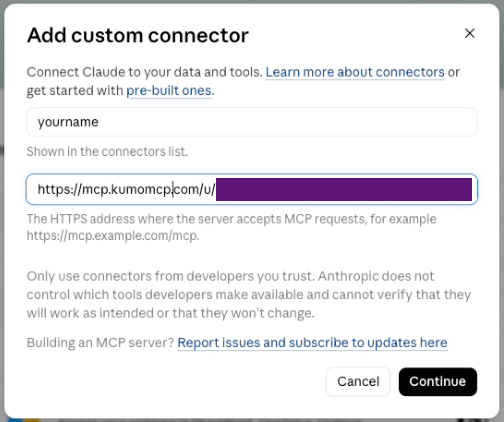
Click Continue. Claude detects that the server does not use sign-in, which is right here, because the URL itself is the credential. Keep No sign-in and click Add:
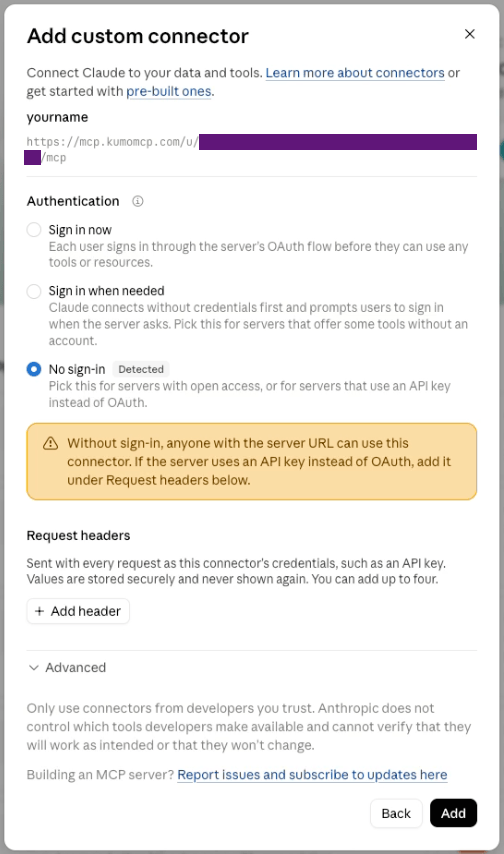
The connector page then lists the tools Claude found. Here that is 19: the 18
data tools plus connection_status. Each tool asks for your approval by
default, and the controls beside it let you allow or block it:
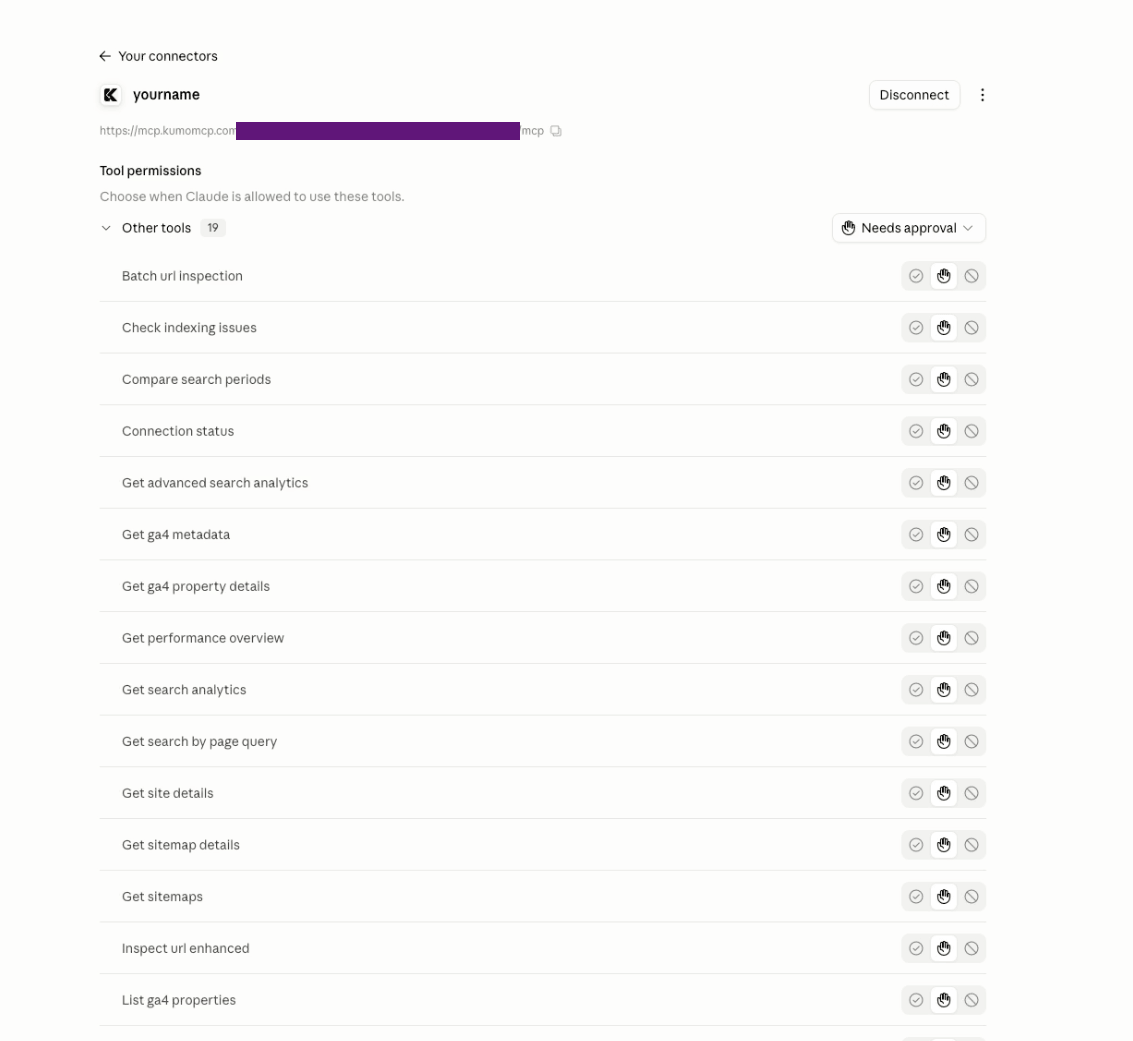
In our test, the same tools were also available in a Code session in that app.
Check that it works
Start a session and ask the agent to run connection_status. It reports your
Google account, the site, the GA4 property and your plan. Then ask real
questions:
| Ask | Tool the agent uses |
|---|---|
| Which queries lost the most clicks in the last 28 days compared with the 28 before? | compare_search_periods |
Which queries bring traffic to /pricing? |
get_search_by_page_query |
Is /pricing indexed, and when was it last crawled? |
inspect_url_enhanced |
| What were my top 10 landing pages by organic sessions last month? | run_ga4_report |
| Which metrics and dimensions can I use in GA4? | get_ga4_metadata |
| How many users are on the site right now? | run_ga4_realtime_report |
The best questions use both: "Compare Search Console clicks with GA4 organic sessions for my top 10 pages over the last 28 days. Show one table with both numbers and flag any page where they differ by more than 50%."
Here is the Claude desktop app answering that question. The Page column is hidden in the screenshot:
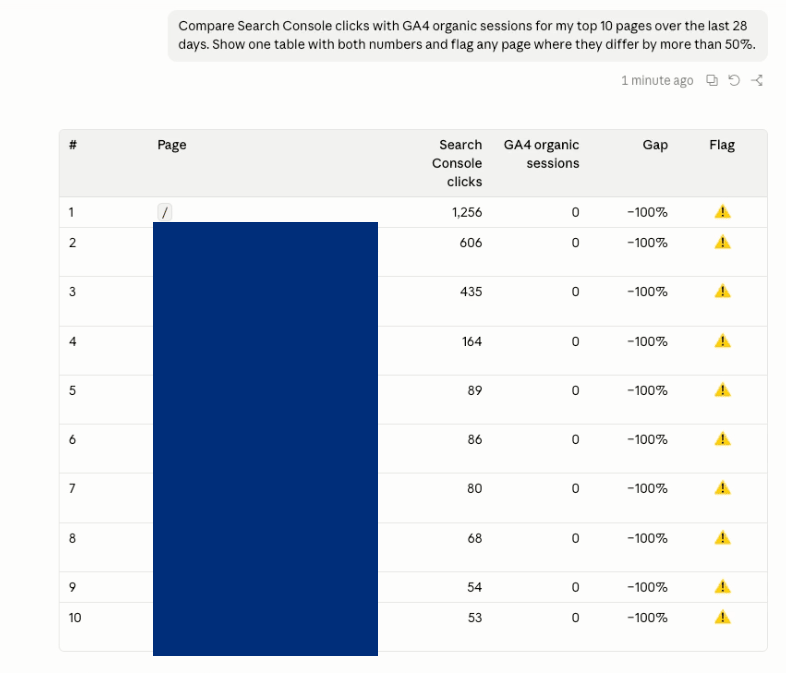
This run is a useful example of what to look for. GA4 shows 0 organic sessions on every page, so every row is flagged with a 100% gap. That is not the normal difference between the two tools. It usually means the GA4 tag is not firing on those pages, or that the GA4 property you selected is not the one that tracks the site. Check GA4 Realtime or DebugView, and the property you picked, before trusting any GA4 numbers.
Expect the two numbers to differ even when everything is set up correctly. Search Console counts clicks from Google Search. GA4 counts sessions, after consent-mode filtering and its own attribution rules. A gap is normal. A gap that is large and specific to a few pages is worth investigating.
Local or hosted: how they compare
Both routes give Claude Code and Codex the same core abilities: search analytics, period comparison, URL inspection, GA4 reports and realtime data. They differ in what it takes to get there and in what you are trusting.
| Local servers | KumoMCP | |
|---|---|---|
| Google Cloud project and OAuth client | Required | Not needed |
| APIs to enable | Analytics Admin, Analytics Data, Search Console | None |
| Installs | pipx and uv, two servers | Nothing |
| Works in Claude Code, Codex, Cursor, Claude Desktop | Yes | Yes |
| Works in Claude.ai and ChatGPT | No | Yes |
| Same setup on every machine | No, repeat per machine | Yes, one URL |
| GA4 tools | 7, including funnel reports and Google Ads links | 5 (properties, details, reports, realtime, metadata) |
| Search Console tools | 20, including sitemap submit and delete | 13, all read-only |
| Choose which tools the agent sees | Through your agent's own settings; mcp-gsc also has a destructive-tool switch | Yes, per endpoint, before the agent sees the list |
| Where your data goes | Google to your machine | Google through KumoMCP to your agent |
| Where credentials live | Files on your disk | Encrypted at rest on KumoMCP, plus the endpoint URL |
| Cost | Free, plus your setup time | Free plan: one site, one GA4 property, one endpoint, every tool |
Where the difference matters
Setup and upkeep. The local route means three APIs to enable, two credential setups, two runtimes, and repeating all of it on every machine you work from. You also own the maintenance when something changes. The hosted route is one Google authorization and one URL. What you give up is control: it is a service you depend on being available, not a process you run.
Reach. A local server only works where the agent can launch a process. That covers Claude Code, Codex, Cursor and Claude Desktop, but not Claude.ai or ChatGPT. A remote URL works in any client that accepts one.
Capabilities. The local servers do more. Only they offer GA4 funnel reports and Google Ads links, and only mcp-gsc can submit or delete sitemaps. KumoMCP's Search Console and GA4 tools are all read-only, and you choose which of them each endpoint exposes, which keeps the agent's tool list short and its options limited.
Trust and data. With local servers your data goes from Google to your machine, using an OAuth client you created and credentials stored in your own files. With KumoMCP, requests go through a third party that holds an encrypted Google connection, and the endpoint URL itself acts as a secret. Neither is wrong. You are choosing between securing your own files and trusting a service.
Cost. The local servers have no fee, and you pay in setup time. KumoMCP's free plan covers one site, one GA4 property and one endpoint, with no per-call metering. More than that needs the Pro plan.
Which one should you pick
- Pick local if you need funnel reports, Google Ads links or sitemap submission from the agent, if your organization keeps Google data off third-party services, or if you already have a Cloud project and want to control the source.
- Pick hosted if you want to be running without a Cloud project, use Claude.ai or ChatGPT, work across several machines, or want a strictly read-only connection.
- Use both if you need the extras. Register the hosted endpoint for daily analysis and the local server only for what the hosted one does not do, such as submitting a sitemap.
Security notes
- Read-only. Both KumoMCP permissions are the
readonlyGoogle scopes. The agent can analyze your data but cannot change anything in Search Console or GA4. - The URL is the credential. Anyone who has it can use every tool on that endpoint. Do not commit it or paste it into a chat. If it leaks, open Endpoints, click Rotate URL and re-run the add command.
- Disconnecting affects both services. They share one Google connection. Disconnecting locks your endpoint URLs until you reconnect. You can also revoke access from your Google account's third-party access page at any time.
Troubleshooting
- Claude Code says the server failed to connect. Check that the command
includes
--transport http, or that a hand-written.mcp.jsonentry has"type": "http". An entry with only aurlis read as a local process. - No GA4 properties listed. The Google account you authorized has no access to a GA4 property. Grant it in GA4 under Admin, then reopen the picker.
- A service shows "Needs attention". The Google authorization has expired or been revoked. Open Services and reconnect.
- The agent answers about the wrong site. If you selected several sites, the default one is used when a question does not name a site. Name the site in your question or change the default in the site picker.
FAQ
Can the agent change my Search Console or GA4 settings? Not through KumoMCP: both permissions are read-only and none of its tools write. The local mcp-gsc server does include write-capable tools, so review what you enable there.
Does this cost anything? The free plan covers one site, one GA4 property, one endpoint and every tool, and calls are not metered. See pricing for the Pro plan.
Can I give an agent only some of the tools? Yes. Untick tools when you create or edit the endpoint. The agent then sees only what is ticked.
Ready to connect? Start free: one site, one GA4 property, every tool, no credit card.